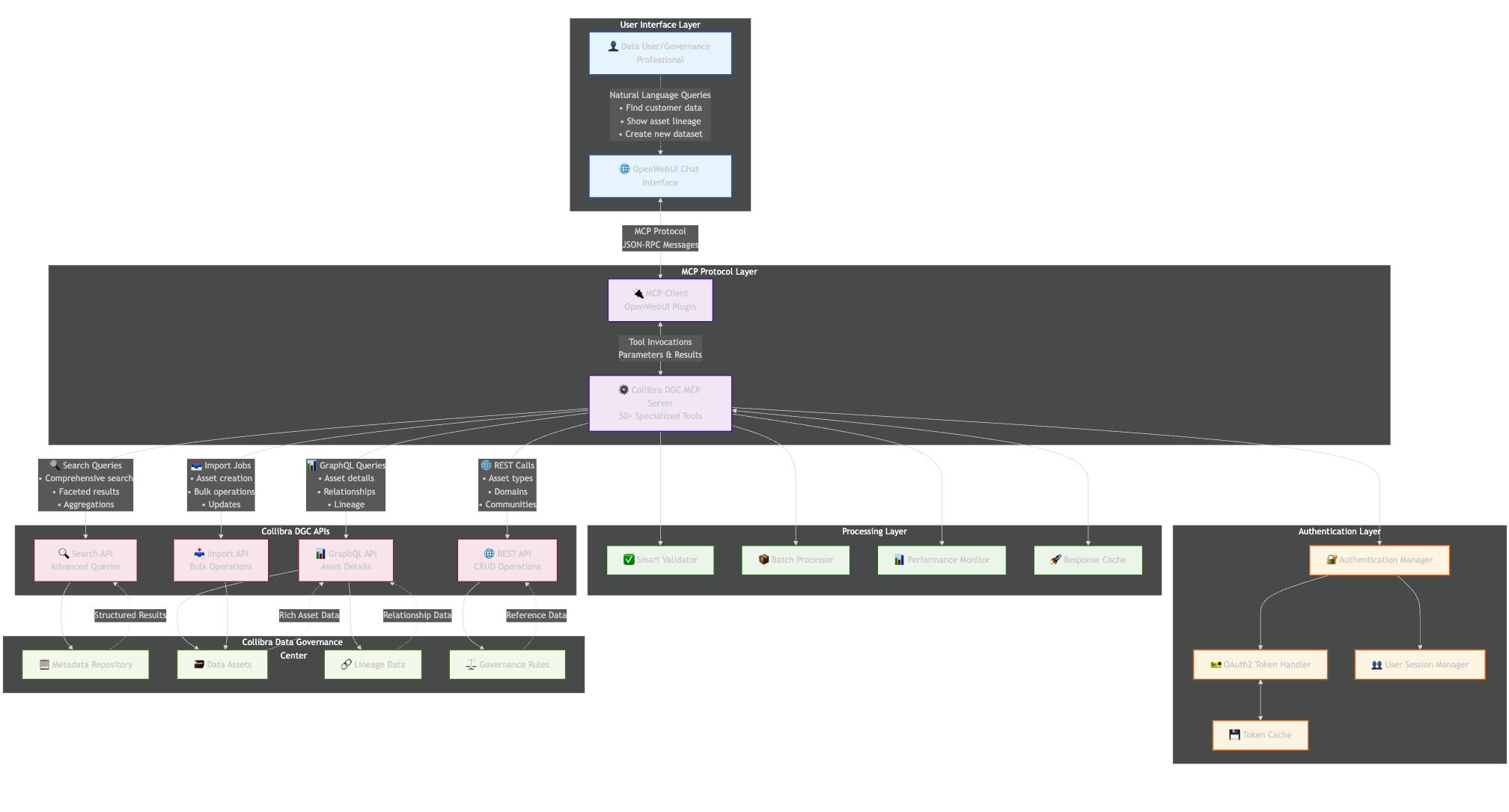
Conversational Metadata Management – MCP Server for Collibra
Overview
Collibra DGC Model Context Protocol Server
Welcome to your metadata manager assistant, once connected to your On-Prem (CPSH) Collibra platform, this tool suite can help you find, manage, and curate assets in the Collibra Platform from any AI chat client that supports MCP.
We also provide a turnkey, ready to run implementation which includes a sophisticated multi-user browser based GenAI chat client, tuned system prompt, fine-tuned models, and secure access.
Platform Support
Collibra Platform Self-Hosted (CPSH) and Collibra Hosted (Commercial, Public Sector, GovCloud)
Security
Streaming HTTP based MCP with Initial connection based on OAuth with pass through user based access support for Basic Auth, SSO, and PKI based authentication.
What This Can Help You With
Search & Discovery
- Find datasets, tables, columns, and other data assets
- Search by keywords, attributes, tags, or metadata
- Discover popular tags and asset distributions
- Use advanced filters and faceted search
Asset Management
- Get detailed information about any data asset
- View asset lineage and relationships
- Create and update assets with validation
- Manage bulk operations efficiently
Data Governance
- Explore organizational structure (communities, domains)
- Understand data relationships and dependencies
- Track data lineage and flow
- Manage asset attributes and metadata
System Operations
- Monitor system performance and health
- Manage authentication and sessions
- Access reference information and documentation
Getting Started
Basic Search Examples:
- “Find all customer datasets”
- “Show me tables in the sales domain”
- “Search for assets tagged with ‘PII'”
Asset Information:
- “Get details for asset [Name]”
- “Show me the lineage for this dataset”
- “What attributes does this table have?”
Creating Assets:
- “Create a new dataset called ‘Customer Analytics'”
- “Add a table to the Finance domain”
- “Validate this asset type before creation”
Key Capabilities
50+ Specialized Tools including:
- Comprehensive search with highlighting and aggregations
- Batch operations for efficiency
- Smart validation to prevent errors
- Performance monitoring and caching
- Relationship management
- Import/export operations
Tips for Best Results
- Be Specific: The more details you provide, the better I can help
- Use Proper Terms: I’ll help translate if you’re unsure about terminology
- Ask for Clarification: I’ll explain complex concepts clearly
- Request Links: All assets I show will be clickable links to the catalog
Important Notes
- Catalog URL: Your Collibra instance.
- Data Source: All information comes directly from your curated data catalog
- Real Data Only: Never uses hypothetical information – everything is from your actual system
- Professional Format: Results are presented in clean tables, charts, and diagrams
Need Help?
Just ask me questions like:
- “How do I find datasets about customers?”
- “Show me the asset type distribution”
- “What’s the lineage for this table?”
- “Create a new data element”
“Check system performance”