
DataXray for Collibra: Streamlining AI and Unstructured Data Governance
Overview
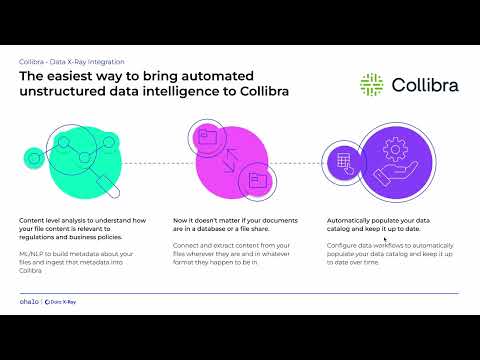
You already govern your databases and applications in Collibra Data Catalog. What’s missing is your files: documents, email attachments, spreadsheets, scans and archives, which is often where your most sensitive data sits.
DataXray finds, reads and classifies those files across your file shares, cloud storage and content platforms, then syncs them into Collibra as governed assets. You deploy it your way: on-premises, in your cloud, hybrid or fully air-gapped. Your files never leave your environment.
What you get in Collibra
- Every unstructured source covered: You connect your sources through 55+ native connectors across on-premises and cloud, plus a universal connector for anything else.
- A clear view of PII and risk: You see where personal data sits in each file and who it relates to, you can pull up everything you hold on one person, and you can protect first where sensitive data is concentrated.
- Files as assets in your catalog: Your files arrive in Collibra as assets, attributes and relations, inside hierarchies that mirror how you store them. DataXray can also trigger your Collibra workflows.
- Your glossary on your files: The glossary terms, asset descriptions and hierarchies you’ve defined in Collibra carry onto the files DataXray has classified, so every file asset is described the same way.
- Data maps and ROPAs that include files: Your records of processing activities cover file content as well as databases, so your retention, deletion and access decisions rest on what a file contains, not where it sits.
- Files you can trust for AI: You can see which files are fit for analytics and for building language models, and which you need to keep out of them.
- Your data stays where it is: DataXray scans files in place, inside your environment, and writes only metadata and classification results to Collibra.
How you set it up
You give DataXray a Collibra service account and choose which datasources to sync. You don’t need any custom development. You decide what syncs, filtering by category, age, owner or sensitive information, and the sync runs after every completed scan or on a schedule you set. It works with Collibra Data Intelligence Cloud and Collibra Data Intelligence On-Prem.
Media
More details
Release Notes
Feature highlights
Data X-Ray 8.7 makes classification easier to run at scale. Move your classifiers between environments, choose exactly which file types are classified, control when extraction runs and what it keeps, and take backups faster with less temporary disk space.
Move classifiers between environments
Export the classifiers of your organization to one file, and import the file into another Data X-Ray environment or organization. For example, promote the labels, annotators, extractors, and settings profiles that you tested in a pre-production environment to production.
Go to Tools > Classifiers export, select the classifiers to export, and click Download bundle. Data X-Ray also selects the classifiers that your selection uses. In the target environment, go to Tools > Classifiers import and select the file. The import matches classifiers by name: it updates the classifiers that exist and creates the others. A bundle does not hold datasources or models, so after the import, add datasources to the new settings profiles and smart labels, and select a model for each new extractor.
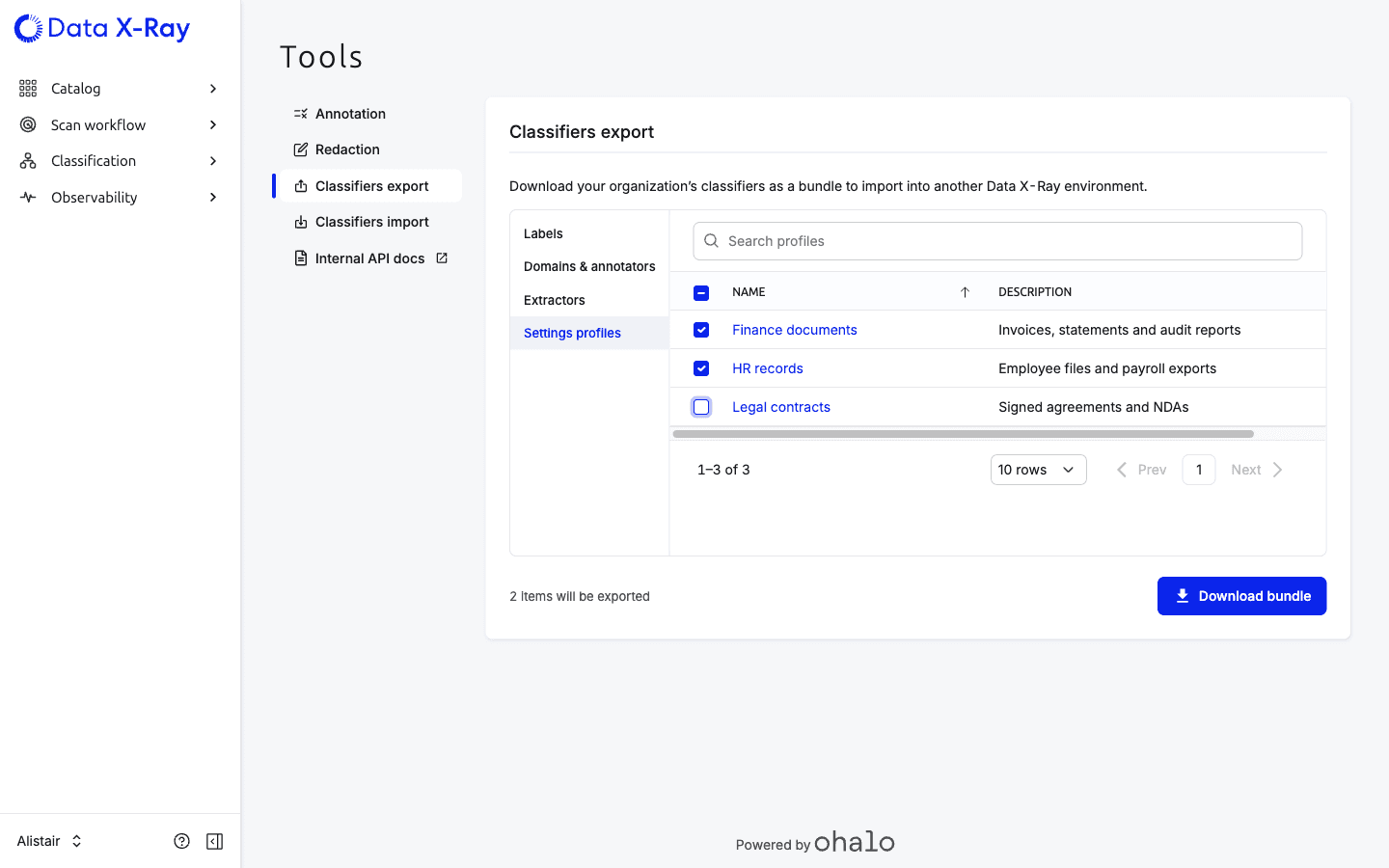
The tools are available to Organizational Admins outside the Base organization who are not Super Admins. See Import and export classifiers for details.
Classify only the file types you choose
File filters can now work as an allow list. Instead of listing every extension to skip, name the extensions to process and Data X-Ray skips everything else. On a settings profile or a datasource, open File filters, choose Only files with these extensions, and enter the extensions to classify, for example pdf;docx.
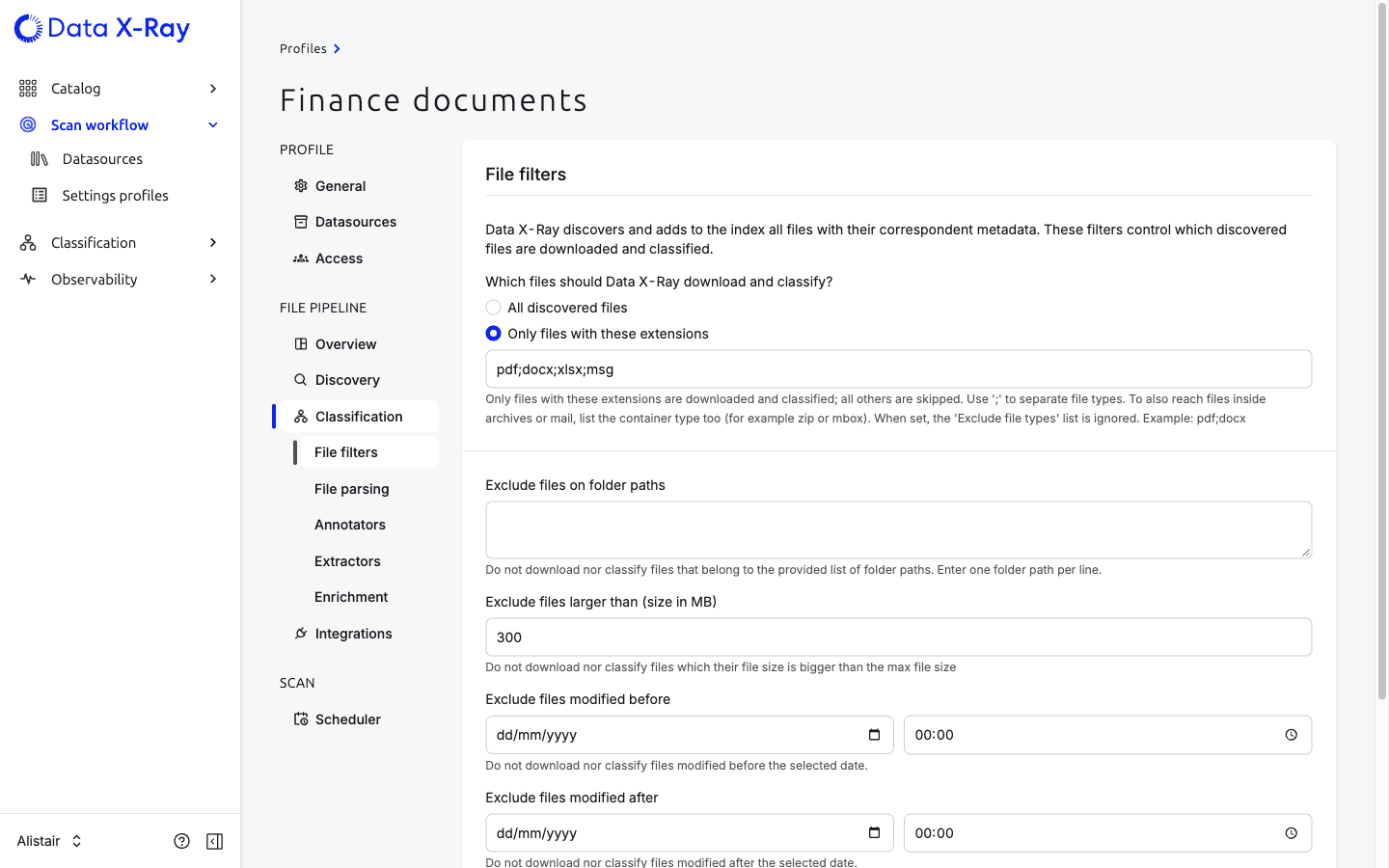
While an allow list is set, it takes precedence over the file type exclusion list, and the Exclude file types field is hidden. Your saved exclusion list is kept and returns if you switch back to All discovered files. Files whose extension is not on the allow list are still discovered and searchable by metadata, but are not downloaded or classified. Those files receive the Allow list exclusion scan status, so they are easy to find in scan reports and search.
To also reach files inside archives or mail, list the container type too (for example zip or mbox).
See File filters for details.
Control when extraction runs and what it keeps
Extraction runs a model call for every file it reaches, so a scan that extracts files again when nothing relevant changed costs time and money. In Data X-Ray 8.7, extraction follows the changes that affect it. Editing an annotator that no workflow condition reads, changing a file filter, changing Purview auto-sync, or saving the same workflow again no longer makes the next scan extract every file again. Editing an extractor that a workflow uses does the opposite: the next scan applies the edit to every file, instead of only to files whose content changed, so an improved prompt reaches the files you already scanned.
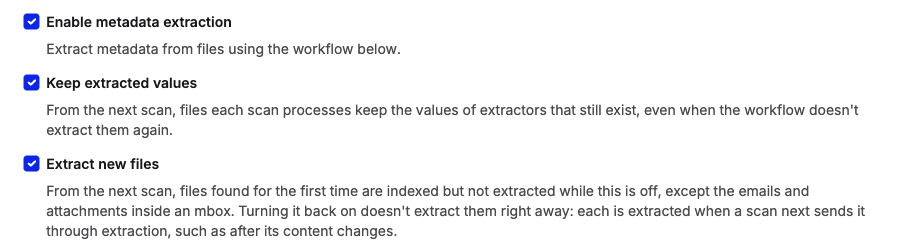
You also decide what extraction keeps. A workflow step can check whether its own extractor already has a value, so a classification such as document type is extracted once per file and kept. Emails inside an mbox, and their attachments, are the exception for now: they are extracted again whenever a scan processes the mbox again. On a settings profile’s Extractors page, Keep extracted values keeps the values a workflow does not extract again, for example after a step is removed, and Extract new files lets a datasource keep indexing and classifying new files without extracting them. Changing either setting does not make a scan process files again. Profiles that exist when you upgrade keep the behavior they had, so Keep extracted values is off on them and on for profiles created in 8.7. Turn it on for an existing profile to use it. See Extraction workflows for when extraction runs.
Faster backups and more dependable restores
Backups are faster and need less temporary disk space. Data X-Ray now compresses a backup with zstd on all of the host’s processor cores, and no longer makes a full copy of the data first. The improvement is largest on deployments with fast storage. On a host where disk read speed is the limit, the backup still saves the time and space of that copy.
Restores are more dependable too:
- A RabbitMQ restore brings back the queues and messages from the backup.
- An Elasticsearch restore no longer fails at “Create the Elasticsearch repository” after it has emptied the Elasticsearch data. On a cluster, that failure also stopped MySQL, MongoDB and RabbitMQ from being restored.
- A MySQL restore over running containers, for example after a reinstall, completes on the first attempt. Each restore now stops the service’s container before replacing its data.
- Backups no longer fail once leftover Elasticsearch snapshot buckets use up SeaweedFS’s volumes.
Compatibility
- AWS
- GCP
- Azure
- On-premises
- Air-gapped
- Collibra Data Intelligence Cloud
- Collibra Data Intelligence On-Prem
Dependency
- Podman
- RHEL
License and Usage Requirements
Release History
Release Notes
Feature highlights
Data X-Ray 8.7 makes classification easier to run at scale. Move your classifiers between environments, choose exactly which file types are classified, control when extraction runs and what it keeps, and take backups faster with less temporary disk space.
Move classifiers between environments
Export the classifiers of your organization to one file, and import the file into another Data X-Ray environment or organization. For example, promote the labels, annotators, extractors, and settings profiles that you tested in a pre-production environment to production.
Go to Tools > Classifiers export, select the classifiers to export, and click Download bundle. Data X-Ray also selects the classifiers that your selection uses. In the target environment, go to Tools > Classifiers import and select the file. The import matches classifiers by name: it updates the classifiers that exist and creates the others. A bundle does not hold datasources or models, so after the import, add datasources to the new settings profiles and smart labels, and select a model for each new extractor.
The tools are available to Organizational Admins outside the Base organization who are not Super Admins. See Import and export classifiers for details.
Classify only the file types you choose
File filters can now work as an allow list. Instead of listing every extension to skip, name the extensions to process and Data X-Ray skips everything else. On a settings profile or a datasource, open File filters, choose Only files with these extensions, and enter the extensions to classify, for example pdf;docx.
While an allow list is set, it takes precedence over the file type exclusion list, and the Exclude file types field is hidden. Your saved exclusion list is kept and returns if you switch back to All discovered files. Files whose extension is not on the allow list are still discovered and searchable by metadata, but are not downloaded or classified. Those files receive the Allow list exclusion scan status, so they are easy to find in scan reports and search.
To also reach files inside archives or mail, list the container type too (for example zip or mbox).
See File filters for details.
Control when extraction runs and what it keeps
Extraction runs a model call for every file it reaches, so a scan that extracts files again when nothing relevant changed costs time and money. In Data X-Ray 8.7, extraction follows the changes that affect it. Editing an annotator that no workflow condition reads, changing a file filter, changing Purview auto-sync, or saving the same workflow again no longer makes the next scan extract every file again. Editing an extractor that a workflow uses does the opposite: the next scan applies the edit to every file, instead of only to files whose content changed, so an improved prompt reaches the files you already scanned.
You also decide what extraction keeps. A workflow step can check whether its own extractor already has a value, so a classification such as document type is extracted once per file and kept. Emails inside an mbox, and their attachments, are the exception for now: they are extracted again whenever a scan processes the mbox again. On a settings profile’s Extractors page, Keep extracted values keeps the values a workflow does not extract again, for example after a step is removed, and Extract new files lets a datasource keep indexing and classifying new files without extracting them. Changing either setting does not make a scan process files again. Profiles that exist when you upgrade keep the behavior they had, so Keep extracted values is off on them and on for profiles created in 8.7. Turn it on for an existing profile to use it. See Extraction workflows for when extraction runs.
Faster backups and more dependable restores
Backups are faster and need less temporary disk space. Data X-Ray now compresses a backup with zstd on all of the host’s processor cores, and no longer makes a full copy of the data first. The improvement is largest on deployments with fast storage. On a host where disk read speed is the limit, the backup still saves the time and space of that copy.
Restores are more dependable too:
- A RabbitMQ restore brings back the queues and messages from the backup.
- An Elasticsearch restore no longer fails at “Create the Elasticsearch repository” after it has emptied the Elasticsearch data. On a cluster, that failure also stopped MySQL, MongoDB and RabbitMQ from being restored.
- A MySQL restore over running containers, for example after a reinstall, completes on the first attempt. Each restore now stops the service’s container before replacing its data.
- Backups no longer fail once leftover Elasticsearch snapshot buckets use up SeaweedFS’s volumes.
Compatibility
- AWS
- GCP
- Azure
- On-premises
- Air-gapped
- Collibra Data Intelligence Cloud
- Collibra Data Intelligence On-Prem
Dependency
- Podman
- RHEL
License and Usage Requirements
Release Notes
Feature highlights
This release carries a substantial reliability investment in the scan pipeline, opens the text parsing pipeline to audio and video, and reorganizes the main navigation menu into grouped sections.
Scans that run through restarts, upgrades and database interruptions
DataXray 8.6 carries the largest reliability investment the scan pipeline has had: more than a dozen changes across crawling, discovery, parsing, classification and the scan lifecycle, aimed at a single outcome — a scan that reports what it actually found.
Work in flight is held rather than discarded. A file being downloaded, parsed, annotated or extracted when a service stops — a restart, an upgrade, or a circuit breaker opening under load — is put back and picked up when capacity returns. Scans ride out a brief database interruption while indexing, a recrawl resumes at the depth it started with, and a scan reaches a true end state rather than waiting on a lifecycle message that never arrived.
On a busy deployment the effect is fewer partially successful scans, and more trust in the numbers behind them: files reported as unreadable are genuinely unreadable, and the counts on a datasource reflect the scan that just ran. Holding is bounded, so a service that restarts repeatedly still reports the files it was holding rather than holding them indefinitely.
No action is needed: every scan after the upgrade behaves this way.
Find features faster with grouped navigation
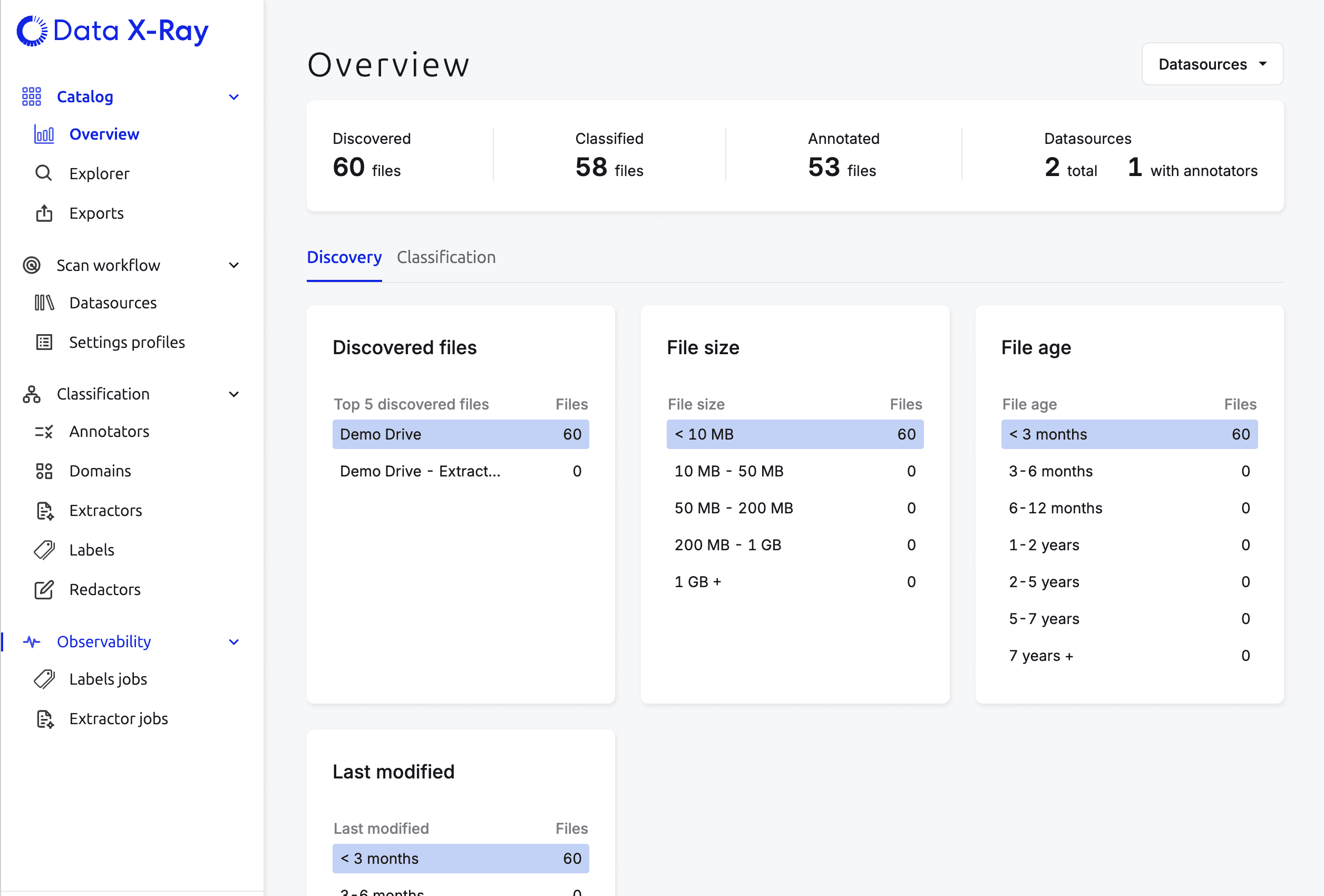
The main navigation menu is organized into sections — Catalog, Scan workflow, Classification, and Observability — in place of the single flat list of links. As DataXray has grown, that list had become long enough that related pages sat far apart and newer areas were easy to overlook.
Pages are grouped under the area they belong to, so moving between annotators and extractors, or between a datasource and the extractor jobs running against it, takes less hunting. The grouping applies to everyone, with no setting to enable.
Classify what was said, not only what was written
Audio and video files can be routed through the text parsing pipeline. Register a transcription engine as a custom parser in Admin Center, declare the media types it handles, and DataXray sends matching audio and video files to it during a scan. The transcript it returns flows through annotation, classification and extraction like any other document text, so meeting recordings, call archives and training footage become governable content rather than opaque files.
Audio and Video appear as rows in the text parsing step of your scan settings. They default to Disabled and become selectable once a compatible custom parser is registered, so the capability is visible before an engine is in place. DataXray does not transcribe media itself: it routes the files and consumes what the engine returns, leaving the choice of transcription engine to you.
Compatibility
- AWS
- GCP
- Azure
- On-premises
- Air-gapped
- Collibra Data Intelligence Cloud
- Collibra Data Intelligence On-Prem
Dependency
- Podman
- RHEL
License and Usage Requirements
Release Notes
Feature highlights
This release improves scan reliability for datasources with heavy scanned-document workloads and adds a dark theme option.
Scale file parsing and OCR independently to keep scans moving
Previously, OCR-heavy scans, which run on datasources containing many large scanned PDFs, competed for the same resources as the rest of the scan pipeline, causing scans to slow dramatically or stall entirely, even for files that did not need OCR at all.
File parsing and OCR now run as an independently scalable service, separate from the rest of the ingestion pipeline. When a datasource with many scanned documents is putting pressure on parsing, operators can scale parsing capacity on its own, without touching the rest of the pipeline. Dedicated metrics and dashboards make slowdowns easier to diagnose and resolve before they affect a governance deadline.
No action is needed by default: existing deployments keep working, and the standard upgrade brings up the new service automatically. To add parsing capacity, see the “Horizontal scaling of file parsers” section of the performance tuning guide.
Choose a dark theme to match your preference
Data X-Ray now offers a dark theme alongside the existing light theme. Switch between them from your account settings under Appearance to cut eye strain, or simply to match your preference.
Compatibility
- AWS
- GCP
- Kubernetes
- ARO
- azure
- Collibra Data Intelligence Cloud
- Collibra Data Intelligence On-Prem
Dependency
- Podman
License and Usage Requirements
Release Notes
.
Compatibility
- AWS
- GCP
- Kubernetes
- ARO
- azure
- Collibra Data Intelligence Cloud
- Collibra Data Intelligence On-Prem
Dependency
- Podman
License and Usage Requirements
Release Notes
Feature highlights
Data X-Ray 8.3 introduces FIPS-validated encryption, establishing a foundation for deployments in regulated industries and government environments. This release also adds the ability to filter for files where GPS coordinates are embedded, multi-select value queries for metadata extractor outputs, and a set of Admin Center and operational improvements.
Enterprise security with FIPS-validated encryption
Data X-Ray 8.3 introduces FIPS mode for deployments in regulated industries and government environments. When enabled, Data X-Ray services use FIPS-validated algorithms and providers:
- Data at rest is encrypted with AES-256-GCM
- Service-to-service TLS uses a FIPS-validated SSL provider
- JWT tokens are signed with HMAC-SHA256, a FIPS-validated algorithm
- TOTP authentication uses HMAC-SHA256 instead of HMAC-SHA1
This release also includes security hardening improvements aligned with government security requirements: default password policies now enforce stronger credentials, and the authentication stack has been modernized by replacing RSA key file-based JWT signing with symmetric HMAC signing.
FIPS mode is available for new deployments and is configured through Ansible inventory. See FIPS configuration for setup instructions.
Discover and classify location-tagged files
The Geolocation field, populated from GPS coordinates in EXIF data, is now available as a filter across the Catalog, Labels, and Extractor Workflows. Organizations handling photography, field reports, or device-generated content can identify and classify files where location coordinates are present, and build policies or classification rules around their availability.
- Filter by the presence of Geolocation under “Other metadata” in the Catalog
- Available consistently across Labels, Catalog, and Extractor Workflows
Multi-select filters for metadata extractor values
Metadata extractor outputs configured with a “One Of” validator can now be queried using Is one of and Is not one of operators directly in the Catalog. A multi-select dropdown replaces the previous plain text input, making it practical to filter for specific extracted values across large result sets without constructing multiple separate queries.
Admin Center and operational improvements
Google Workspace account settings have moved from user preferences into the Admin Center, where organization-level configuration belongs. Super Admins now land directly in the Admin Center after sign-in, scan status labels in the datasource view have been reworded for clarity, and the sidebar now meets WCAG 1.4.1 color contrast requirements. Self-managed deployments gain new public documentation for tuning container resource limits.
Compatibility
- AWS
- GCP
- Kubernetes
- ARO
- azure
- Collibra Data Intelligence Cloud
- Collibra Data Intelligence On-Prem
Dependency
- Podman
License and Usage Requirements
Release Notes
Feature highlights
This release expands how Data X-Ray connects to enterprise environments and manages classification at scale. Kerberos authentication for SMB connectors removes an access barrier in environments where NTLM is not accepted, searching dictionary contents makes it practical to manage large annotator libraries, and a new connector plugin framework enters beta—enabling integration engineers to build connectors for systems Data X-Ray does not natively support.
Connect to Kerberos-secured SMB file shares
Organizations running SMB file shares in Active Directory domains—including Azure Files SMB servers—can now authenticate with Kerberos, unblocking environments that do not accept NTLM credentials.
KDC and realm are configured once at the deployment level; all SMB datasources then authenticate without any additional datasource configuration.
Find which dictionaries contain a term
Teams managing large annotator libraries can now search for a specific term across all dictionaries and immediately see which ones contain it. Previously, tracking down a term required manually reviewing dictionaries one by one, or maintaining a separate spreadsheet as the master reference.
The search is case-insensitive and works across dictionaries of any size, returning results in under three seconds even for dictionaries with thousands of entries.
Extend Data X-Ray to any data source with connector plugins (Beta)
A connector plugin framework is now available in beta, allowing integration engineers to build custom connector plugins for any external system Data X-Ray does not natively support, using a gRPC-based SDK in Python, Java, or any gRPC-compatible language.
Connector plugins behave like native datasources: scans, rescans, change detection, and the full classification pipeline all work automatically. Connector plugins run as local processes on the same host as Data X-Ray, so credentials and data never leave the security perimeter.
Available in beta for non-production environments. Contact us to learn more.
Compatibility
- AWS
- GCP
- Kubernetes
- ARO
- azure
- Collibra Data Intelligence Cloud
- Collibra Data Intelligence On-Prem
Dependency
- Podman
License and Usage Requirements
Release Notes
Feature highlights
This release enhances document processing capabilities with validated LLM Extractor outputs, configurable OCR strategies for balancing speed and quality, and binary file extraction during automated scans. Security improvements include envelope encryption now enabled by default, providing stronger protection for credentials and API keys with support for key rotation.
Flexible, validated LLM Extractors for consistent document processing
LLM Extractors now support output validation and binary file processing in automated scans, creating a unified workflow for document analysis. Define allowed values for text extractors to ensure consistent, reliable results, then apply those extractors during datasource scans with full support for binary file types.
Output validation guarantees LLM responses match predefined values, enabling multi-dimensional categorization across document type, sensitivity level, department, and retention policy with structured output support for compatible models.
Binary file processing now works seamlessly in automated scan workflows. Extractors configured with “Attach original file” receive binary content during datasource workflows, with automatic file lifecycle management—no configuration changes required.
Together, these capabilities reduce the number of resources to manage while delivering more consistent, powerful workflows for document classification and extraction.
Deprecation notice
Document Categorizer will be removed in Data X-Ray 8.4. Check out our migration guide for details on moving to LLM Extractors.
Choose OCR speed or thoroughness for document processing
The built-in OCR processor now offers two strategy options, giving you control over how aggressively OCR runs on PDF pages.
- Fast: Optimized for speed. OCR runs only when little or no usable text is detected. Best for PDFs created digitally with a reliable text layer.
- Thorough: Optimized for completeness. OCR runs more aggressively to recover missing, garbled, or incomplete text. Best for scanned or mixed-quality PDFs.
Configure the OCR strategy in datasource settings or settings profiles. Existing datasources default to thorough mode to maintain current behavior.
Stronger encryption for database credentials
Data X-Ray now uses envelope encryption with modern symmetric ciphers (AES-256-GCM or XChaCha20-Poly1305) for protecting sensitive information stored in the database, including datasource credentials and API keys. This replaces the previous RSA-based approach with stronger, more flexible encryption.
- Envelope encryption with unique keys per secret improves security isolation
- AES-256-GCM option available for environments requiring FIPS-approved algorithms
- Simplified key rotation with minimal downtime
- Automatic migration of existing encrypted values during upgrade
Compatibility
- AWS
- GCP
- Kubernetes
- ARO
- azure
- Collibra Data Intelligence Cloud
- Collibra Data Intelligence On-Prem
Dependency
- Podman
License and Usage Requirements
Release Notes
Feature highlights
Enforce extraction rules automatically during scans
Datasource owners can now define multi-step extraction workflows that run the moment files are scanned. Each step includes:
- Conditions based on any file metadata—including path, MIME type, dates, annotators, or results from earlier extraction steps.
- Actions that run the appropriate extractor only when those conditions match.
This allows compliance, privacy, and data governance teams to encode organizational rules directly into their datasources—for example, extracting contract clauses, categorizing resumes, or enriching regulated documents—without post-scan intervention or external scripts. Workflows run in order and can chain extractors to apply deeper analysis only to relevant documents.
Choose the right AI model for each extractor
Data X-Ray now lets organizations configure multiple LLM models and assign the most suitable one to each extractor. Instead of relying on a single model for all tasks, teams can optimize for accuracy, cost, speed, or data residency at the extractor level.
Admins can build a library of models—from OpenAI, Azure OpenAI, AWS Bedrock, or local Ollama deployments—and extractor creators simply choose the model that best fits the job. A fast, lightweight model can handle high-volume extractions, while more capable models can be reserved for complex reasoning or contract analysis. Local or self-hosted models can be used when sensitive content cannot leave the environment.
Extract richer metadata using the full source document
LLM extractors can now process the original binary file—not just extracted text—when run manually. This allows models to interpret tables, images, and layout, enabling extraction from visually structured documents such as invoices, forms, and technical reports.
Text-based extraction remains the default, while this new option gives teams an early opportunity to experiment with full-document analysis. Support for using this capability inside automated extraction workflows will follow in an upcoming release.
Configure datasources with a clearer, pipeline-based flow
Datasource settings have been reorganized to reflect how a file actually moves through a scan. Discovery settings, exclusion filters, OCR processors, annotators, and extractor workflows now each have their own dedicated pages, and a new Overview provides a bird’s-eye view of the entire file pipeline. This makes it easier for datasource owners to understand which parts of the scan are active, adjust specific stages, and verify that a datasource is configured as intended.
Discover a clearer, more structured documentation experience
The documentation has been re-organized to mirror the product’s workflow: start by preparing your classification toolkit, then add and configure datasources, run scans, and explore results. Connectors, configuration steps, and conceptual guidance now appear where users naturally expect them, helping new teams onboard faster and making it easier for experienced users to find what they need without navigating across unrelated sections.
Manage administration from a unified Admin Center
The Console is now integrated directly into Data X-Ray as the Admin Center, giving administrators a single, consistent place to manage users, connector credentials, integrations, and other system settings.
Back up and restore complete Data X-Ray environments
It is now possible to fully backup Data X-Ray, including scan progress, data stores, and settings. New Ansible playbooks can stop all required services, take full backups of all datastores, and restore environments. This means for upgrades or environment migrations Data X-Ray can be restored with all settings and scan progress persisting.
Compatibility
- AWS
- GCP
- Kubernetes
- ARO
- azure
- Collibra Data Intelligence Cloud
- Collibra Data Intelligence On-Prem
Dependency
- Podman
License and Usage Requirements
Release Notes
Feature highlights
Smarter and faster LLM Extractors for deeper document insights
We’ve delivered a set of powerful enhancements to the LLM Extractors, enabling more accurate extraction from complex documents, improving job efficiency, and providing greater flexibility in how you capture data.
1. Multimodal Extraction with File Attachments
The LLM Extractor now offers the option to send the full source document as a file attachment directly to the Large Language Model, moving beyond text-only analysis.
This enhancement is critical for extracting metadata from documents where visual context, tables, or layout are key to interpretation, such as invoices, forms, or scanned reports. The LLM can now “see” and process images, charts, and table formatting that traditional text extraction might miss.
2. Boosted Efficiency with Indexed Text Retrieval
Extraction is now faster: Data X-Ray checks for indexed raw document text before re-downloading files or re-running extraction. If available, it uses the indexed text immediately, reducing job time and latency.
3. New Boolean Output Data Type
The LLM Extractor now supports a dedicated Boolean Output Data Type for extracting clear Yes/No answers, such as the presence of a legal clause or compliance status. It accepts variations like "true", "false", "yes", and "no". See Output Data Types for prompt examples.
SAML SSO with Group Mapping Now Available
We’ve delivered SAML 2.0 Single Sign-On (SSO) with Group Mapping, fulfilling a key requirement for enterprise-grade security and governance. This update integrates Data X-Ray with your existing Identity Provider (IdP) (e.g., Okta, Azure AD) to manage access and permissions centrally.
This feature enables key operational benefits:
- Policy Enforcement and Governance: Centralizing authentication strengthens your audit and compliance posture by enforcing consistent identity policies for Data X-Ray access via your IdP.
- Automated Access Control: Group mapping ensures users are automatically granted the correct Role-Based Access Control (RBAC) upon sign-in, maintaining a principle of least privilege.
- Simplified User Provisioning: Just-in-Time (JIT) provisioning streamlines the onboarding of new users, ensuring access aligns immediately with their security entitlements.
API versioning and new Beta redaction endpoint
This release strengthens API reliability and version consistency across the platform. Core endpoints for classifications, redactions, and file management have been promoted to stable v1, ensuring long-term compatibility and predictable integrations. A new Beta redaction API and improved metadata exports extend functionality while maintaining backward compatibility for existing clients.
Compatibility
- AWS
- GCP
- Kubernetes
- ARO
- azure
- Collibra Data Intelligence Cloud
- Collibra Data Intelligence On-Prem
Dependency
- Podman
License and Usage Requirements
Release Notes
Feature highlights
Track scan progress at scale with sortable and filterable datasource lists
When managing thousands of datasources, it’s now faster to see what is scanning and how many files have been processed. The datasource list has been rebuilt to load in under seconds—even with 20,000 datasources—and now supports client-side pagination, sorting, and filtering.
Compliance analysts and administrators can quickly filter by datasource type, owner, classification status, or scan state to spot issues and confirm progress. The updated status widget also displays detailed file counts, with a visual progress bar that makes scan status instantly clear. This reduces time spent chasing incomplete scans and helps teams prioritize attention where it’s needed most.
Use external APIs to strengthen governance records
The beta APIs now expose more complete metadata, enabling governance platforms to rely on Data X-Ray as a single source of truth. New endpoints provide:
- File origin (SharePoint, OneDrive, Box) for clear source attribution.
- Ownership and authorship metadata (“owner,” “created by,” “modified by”) for accountability trails.
- Scan depth to distinguish between discovery-only and full classification coverage.
- List available redactors and classification catalog (annotators, domains, labels, and extractors) for consistent governance definitions.
Try them out today from the API reference section in the product documentation site.
Find files by extractor and unlock new model options
Extractors turn unstructured files into structured metadata, making it possible to capture contract clauses, invoice totals, or clinical trial outcomes without custom development. With this release, users can now search for files by the extractor that was applied, regardless of the extracted value.
In addition, new Amazon Nova models are now available for LLM-based extractors. This gives AI governance leaders and data stewards more flexibility in how they design prompts and extract nuanced information, while aligning with enterprise model strategy.
Compatibility
- AWS
- GCP
- Kubernetes
- ARO
- azure
- Collibra Data Intelligence Cloud
- Collibra Data Intelligence On-Prem
Dependency
- Podman
License and Usage Requirements
Release Notes
.
Compatibility
- AWS
- GCP
- Kubernetes
- ARO
- azure
- Collibra Data Intelligence Cloud
- Collibra Data Intelligence On-Prem
Dependency
- Podman
License and Usage Requirements
Release Notes
Feature highlights
In this release, we continue to expand the depth and control of Data X-Ray’s metadata extraction, improve visibility into file access across Microsoft environments, and simplify deployment for IT teams.
Extract smarter with new data types and more control
Extractors use natural language prompts to pull structured information, like project names or contract dates, from file content. They help transform unstructured data into searchable, filterable fields. In this release, you can now configure extractors to return numeric values, not just strings—making it easier to apply filters like “greater than” or “less than” on extracted fields. This is the first step toward supporting additional output types such as dates, booleans, and objects.
This release also allows users to cancel an in-progress extractor job, offering more flexibility and control when running large or experimental extractions.
These enhancements are especially helpful for data stewards and AI governance leads who need precision and agility when designing metadata strategies.
See who has direct access to files in Microsoft platforms
Data X-Ray now displays the list of users and groups who have been granted direct access to a file in SharePoint 2019 (REST) and OneDrive. This means that when a file is shared explicitly through assigned permissions you can now see exactly who can access it.
This update gives privacy officers, security teams, and CDOs the clarity they need to assess entitlements and control access to sensitive content. All access information is visible in the platform and can be exported for compliance or auditing needs.
Improved navigation with a new vertical menu
We’re redesigning the main navigation menu to use a vertical layout instead of the current horizontal structure. This update is part of a broader UX improvement effort aimed at making the platform easier to use, especially as we continue to add more capabilities.
Easier single-server deployments with inventory files
For teams running single-server deployments, we have simplified the process by adopting an Ansible inventory file structure—already familiar to those managing multi-server setups. Instead of running a long one-liner command, admins can now manage Data X-Ray deployment configuration more easily.
This change improves clarity and maintainability for IT administrators and system engineers managing installations in sensitive environments.
Compatibility
- AWS
- GCP
- Kubernetes
- ARO
- azure
- Collibra Data Intelligence Cloud
- Collibra Data Intelligence On-Prem
Dependency
- Podman
License and Usage Requirements
Release Notes
Feature highlights
We’re excited to share the latest updates to Data X-Ray. This release introduces new ways to extract and manage metadata, enhanced security controls, streamlined export capabilities, and an easier way to help us improve the product through anonymous usage data sharing.
Extract rich metadata effortlessly with new extractors
You can now create and manage custom extractors using natural language prompts, powered by Large Language Models (LLMs). Whether you need to identify project names, capture contract dates, or summarize documents, extractors make it simple to gather metadata from your files.
This feature is designed for data stewards, compliance teams, and AI governance leaders who need flexible, efficient metadata extraction without writing complex rules.
Key use cases:
- Custom Metadata Extraction: Define specific prompts to capture unique metadata tailored to your organizational needs, such as project names, contract termination dates, or custom fields.
- Document Summarization: Generate concise and insightful document summaries to facilitate quicker review and decision-making.
- Multiple Document Types: Go beyond Document Categorizer and allow a file to have multiple types.
- Schema extraction: Extract complex structures for downstream processing.
Key capabilities:
- Define and manage extractors with custom LLM prompts.
- Run extractors manually on selected files.
- Use extracted metadata to create Smart Labels and improve searchability.
- Preview results directly in Data X-Ray or export them via CSV or API.
Strengthen account security with enhanced password policies
To meet enterprise-grade security standards, we’ve introduced a range of new authentication controls that will especially benefit information security leaders and IT administrators seeking stronger compliance and improved user management.
What’s new:
- Account lockout after multiple failed login attempts.
- Enforced password change at first login.
- Prevention of password reuse across recent password history.
- Configurable password expiration intervals (e.g., every 3 or 6 months).
- Enhanced authentication logging for better security monitoring.
- Administrative control via the Console.
Simplify text export and DSAR workflows
We’ve added a new API that lets AI data engineers and privacy teams easily export text from scanned documents. You can apply Data X-Ray’s redaction rules to automatically remove sensitive information, making this ideal for privacy teams, compliance officers, and data engineers handling DSARs and document exports.
Key features:
- Apply redaction rules to remove sensitive information automatically.
- Download original or redacted files directly from Data X-Ray.
- Streamline Data Subject Access Requests (DSARs) with quick file identification and export.
- Deprecation notice: The older casefile export feature has now been removed.
Help improve Data X-Ray with anonymized usage metrics
We’ve introduced an optional feature that lets you securely share anonymous product usage metrics. This will benefit all users interested in helping shape the future of Data X-Ray while keeping their data private and secure.
Benefits of sharing usage data:
- Enhance product development based on real user needs.
- Proactively identify bugs or crashes to ensure optimal performance.
- No personally identifiable information is collected.
How to share data:
- Download the prepared file from the Console.
- Submit it to our team.
Our customer success team is available to assist.
Compatibility
- AWS
- GCP
- Kubernetes
- ARO
- azure
- Collibra Data Intelligence Cloud
- Collibra Data Intelligence On-Prem
Dependency
- Podman
License and Usage Requirements
Release Notes
What’s new
Unstructured data is difficult to manage, especially when it comes to text extraction and PII recognition. In this release, Data X-Ray introduces three key updates:
- Google Document AI OCR integration,
- Generic OCR connector integration,
- Improved PII recognition through updated named entity annotators.
These enhancements provide better document understanding, more control over OCR selection, and greater accuracy in identifying key information.
Feature highlights
Google Document AI for improved text extraction
Organizations can now choose their OCR processor for PDFs, images, and Office documents at the datasource level or within settings profiles. This flexibility allows for optimal document processing based on specific business needs.
Traditional OCR can struggle with complex document layouts and non-English documents. Data X-Ray now integrates with Google Document AI OCR, which processes entire documents holistically. Supporting over 200 languages, it delivers higher accuracy, even in cases with rotated text, varying font styles, and hidden elements.
Find out more about how to configure Google Document AI processor and how to use it.
Generic OCR integration for more flexibility
Enterprises using proprietary OCR solutions can now connect their own OCR technologies to Data X-Ray’s document ingestion pipeline. By specifying an endpoint, authentication details, and supported file types, organizations can integrate their preferred OCR engine. This ensures compatibility with Data X-Ray’s governance and security tools while allowing businesses to use OCR processors that fit their specific needs.
Find out more about how to configure a generic OCR processor and how to use it.
Updated Named Entity annotators for better data classification
Data governance depends on identifying key entities such as names, locations, and financial terms within documents. This update improves the accuracy of Named Entity Recognition (NER) annotators, ensuring more precise identification of critical information in natural language text. Organizations benefit from better classification, faster compliance checks, and stronger data protection measures.
Compatibility
- AWS
- GCP
- Kubernetes
- ARO
- azure
- Collibra Data Intelligence Cloud
- Collibra Data Intelligence On-Prem
Dependency
- Podman
License and Usage Requirements
Release Notes
Highlights of Release 7.15
Bi-Directional Microsoft Purview MPIP Labels
Make Data Loss Prevention (DLP) enforcement more precise with full Microsoft Purview Information Protection labels (MPIP) label synchronization, now generally available. This integration enhances Microsoft Purview’s native classification in E3 and E5 environments.
- Extract MPIP labels from files and search, filter, or sort them inside Data X-Ray.
- Assign MPIP labels directly to SharePoint and OneDrive files through Data X-Ray’s classification system.
- Maintain consistent labeling across platforms, improving downstream integration with Microsoft Purview.
Enhanced Smart Labels
We’ve expanded smart labeling capabilities to cover more use cases, giving you greater flexibility in classification.
- Identify files by partial or full path.
- Apply labels based on file name patterns.
- Use annotation-based labeling for document-heavy environments.
- Create labels directly from search queries—no extra steps needed.
More control, less manual work.
Prioritize Urgent Scans Instantly
No matter how well scan schedules are planned, urgent requests can arise. At times, Data X-Ray may be running long scans, causing delays in processing high-priority data sources.
Having to wait for data is contrary to our values. Manually triggered scans can now be run with high priority, allowing them to start immediately and finish without waiting for ongoing lower-priority scans to complete. Get the results you need, faster.
Compatibility
- AWS
- GCP
- Kubernetes
- ARO
- azure
- Collibra Data Intelligence Cloud
- Collibra Data Intelligence On-Prem
Dependency
- Podman
License and Usage Requirements
Release Notes
Microsoft Purview, a new integration
Data X-Ray now integrates with Microsoft Purview, enhancing Microsoft’s native classification capabilities within E3 and E5 environments.
With this integration, you can extract Microsoft Purview Information Protection (MPIP) labels from files, providing clear visibility into where sensitive data is stored. Identify how many datasources contain files with sensitive labels, or determine which users may be impacted by new rule implementations. Create tailored policies to meet your unique needs and re-label files as your data evolves. This ensures that downstream Data Loss Prevention (DLP) controls are more precise and effective.
Data X-Ray’s Microsoft Purview integration is currently available as a Tech Preview.
Rank your files by how much sensitive data they hold
Data X-Ray users can now rank their files by the distinct count of any annotators found on the file and export this information to downstream integrations, enhancing data remediation strategies and streamlining workflows. Find this new option in the Other metadata filter.
By quantifying sensitivity, risk, or relevance, teams can make smarter decisions that drive meaningful results.
Simplified deployments
Deploying and managing Data X-Ray environments is now easier and more robust with Ansible as a deployment tool. Whether you’re working with single-server or multi-server setups, Ansible provides a reliable and reproducible way to deploy, upgrade, and customize your Data X-Ray environment.
This approach also supports Infrastructure as Code, enabling you to manage environment-specific changes with precision and scalability. Ansible ensures consistency across all deployments, helping organizations maintain robust and adaptable data infrastructures.
Compatibility
- AWS
- GCP
- Kubernetes
- ARO
- azure
- Collibra Data Intelligence Cloud
- Collibra Data Intelligence On-Prem
Dependency
- Podman
License and Usage Requirements
Release Notes
On-Demand Classifier (Tech Preview):
Integrate Data X-Ray’s classification engine into your workflows to enhance security and make everyday processes more efficient. Use it for tasks like:
- Email Attachment Scanning: Identify sensitive data before it’s sent externally
- Approval Workflows: Verify documents before they progress to the next step
- File Upload Portals: Scan incoming files for restricted content.
With an easy-to-use API, Data X-Ray applies your centrally defined classification rules automatically, securing files during transit or processing while keeping rule management simple.
Sort by Annotator Counts
See how often each annotator appears in a file with new columns in the Search and Datasource tables. This feature provides deeper insights, especially in risk and sensitivity contexts, where knowing only that an annotator is present doesn’t tell the whole story.
Search by Annotator Value
Data X-Ray’s search functionality has been expanded to include phrases from any annotator, not just those generated by Machine Learning. This improvement broadens search capabilities, helping you quickly find exact annotator values in any file.
Classification Dashboard is Now Available
The Classification Dashboard is now live after a successful testing phase. It offers a comprehensive view of your data landscape, making it easier to explore and analyze classified and discovered data buckets.
Compatibility
- AWS
- GCP
- Kubernetes
- ARO
- Azure
- Collibra Data Intelligence Cloud
- Collibra Data Intelligence On-Prem
Dependency
- Podman
License and Usage Requirements
Release Notes
Classification dashboard: Your data visualized
The classification dashboard provides an overview across all your datasources, and gives you the power to drill down on individual datasources. In this release, you can now see classification insights that show exactly how many documents are associated with certain annotators, annotator domains, labels or categories.
Currently available as a Tech Preview, this feature is active by default on this release.
File entitlements: a new discovery scan option
Knowing who has access to your organization’s files is essential for protecting your most valuable information. Data X-Ray can now fetch richer file entitlements metadata during discovery scans, enabling searching, sorting and filtering of specific users that have access to your organization’s files.
This feature is currently available at the datasource level on Box and SMB datasources, with additional datasource types to follow in the next product releases.
Improved discovery scan times
The discovery phase of a scan happened in a sequential way and, on extremely large datasources, this could result in longer times to discovery all folders and files. Data X-Ray now takes advantage of parallelization to discover files faster.
File hash and duplicate detection
Check for file duplicates with the new binary hash metadata on classification scans. Binary hash is a new file metadata created as part of a file classification. It is calculated from the file itself and it is invariant with respect to the extracted content.
Binary hash has full support on filters and metadata exports. It is available on new classification scans, on any type of file.
Compatibility
- AWS
- GCP
- Kubernetes
- ARO
- Azure
- Collibra Data Intelligence Cloud
- Collibra Data Intelligence On-Prem
Dependency
- Podman
License and Usage Requirements
Release Notes
More Discovery Insights Available on the Home Dashboard (Tech Preview)
Our latest update brings more powerful insights to your Data X-Ray dashboard, giving you a comprehensive view of your discovery process and direct access to the files that matter most.
Now, you can easily identify the largest data sources, whether by total files or the number of files with annotations. You can also explore how your files are distributed by age and size. Each data point is a link taking you straight to the list of files in question, allowing you to go beyond the aggregations.
The dashboard provides insights across all your data sources, with the flexibility to zoom in on individual datasources for more detailed reporting.
Currently available as a Tech Preview, this feature will soon be expanded to include classification insights. Get in touch with us if you want it enabled for your organization.
Enhanced control over LLM categorization prompts
Achieving highly accurate categorization in Data X-Ray is straightforward, provided your prompts are well-structured for the task.
Previously, our prompt editor offered limited customization. With version 7.11, you now have full control over the entire prompt structure, as long as the final prompt contains the required variables {{categories}} and {{document_text}}.
Quickly compare and sort relevant metadata for enhanced file management
When inspecting files after a scan, having all the relevant metadata in view helps you quickly compare, sort, and access the files you need.
With our latest update, you can now tailor the columns on both the Search and Datasource pages. Select the metadata fields—such as file size, OCR used, or category—and arrange them in the order that best suits your workflow. This added control makes your post-scan analysis more efficient.
Compare common file information at a glance
Search and find results uniformly from any connected datasources. Data X-Ray now displays common file metadata in a consistent format, allowing you to compare files quickly at a glance. For more details, open the file preview to view extended metadata, including file entitlements.
Compatibility
- AWS
- GCP
- Kubernetes
- ARO
- Azure
- Collibra Data Intelligence Cloud
- Collibra Data Intelligence On-Prem
Dependency
- Podman
License and Usage Requirements
Release Notes
Summary
In this version, you’ll find:
- A new Google Cloud Storage connector
- Improved discovery scans for Box
- Advanced OCR settings for classification scans
- The ability to skip folders during classification scans on multiple connectors
- Smoother customer support with diagnostic files
Google Cloud Storage
Is your organization using Google Cloud Storage to store unstructured data? That is no problem! Data X-Ray now supports Google Cloud Storage with a native connector. Find more about how to set it up in our documentation.
Discovery scans: Exclude files not owned by primary Box account
Organizations using Box as their chosen document platform often share folders with teams. This practice can affect Data X-Ray scan speed, as it treats each Box account as a different datasource, scanning all the files the account has read access to.
Data X-Ray now offers a discovery configuration to exclude folders and files not owned by the primary Box account. This setting, which is active by default, is available in the datasource settings and settings profiles.
Classification scans: New OCR settings available now per datasource
OCR (Optical Character Recognition) can extract text from images and embedded images in documents but it can be resource-intensive. Now, atasource managers can configure OCR settings per datasource, giving them control over which document types to apply OCR to, including images, PDFs, and Office documents from both Microsoft and the OpenDocument suite.
When upgrading:
- If initially Data X-Ray global OCR setting was set as Optional, then all created datasources will have the settings “Images” and “PDFs” applied.
- If initially Data X-Ray global OCR setting was set as Aggresive, then all created datasources will have the settings “Images”, “PDFs” and “Office Documents” applied.
Note you might find some speed performance degradation if you are using the default configurations or if you select the OCR option on all possible file types. If that is the case, you might see on the Grafana dashboards that the Parsers queue is becoming a bottleneck and the OCR process is taking longer than before. To improve the situation, you can follow the new recommendations on Scanning performance considerations.
Classification scans: Skip folders now supported on OneDrive, Sharepoint, Google Drive, and Box native connectors
Just add the complete folder path you would like to skip on the datasource classification settings or settings profile to make your scans faster by not classifying content you do not need to.
Skipping folders when classifying documents was introduced on Data X-Ray 7.8 and it would only support SMB native connector. Find enlarged support now: available for SMB, OneDrive, Sharepoint, Google Drive, and Box native connectors.
Smoother customer support with diagnostic files
Troubleshooting an issue when Data X-Ray is installed on your premises can be challenging as it may involve a large number of manual steps to obtain the application metrics and logs that our second-tier support may need. To help fix this, Data X-Ray administrators can now generate a diagnostic file directly through the application Console that is ready to be sent to the Ohalo support team. Find more about its usage at our documentation.
Compatibility
- AWS
- GCP
- Kubernetes
- ARO
- Azure
- Collibra Data Intelligence Cloud
- Collibra Data Intelligence On-Prem
Dependency
- Podman
License and Usage Requirements
Release Notes
Categorization now possible with Ollama models
With Ollama support, you can reduce inference cost and increase privacy and security when categorizing documents. Find the configuration on Data X-Ray Console.
More options when integrating with Collibra
In the datasource settings, you can now configure your Collibra integration to synchronize only the documents that are relevant to you. This can be based on their category, age, owner, sensitive information and much more. In that same page, you can also configure the integration to run everytime the datasource finishes a new scan, keeping your data in Collibra up-to-date is easier than ever!
This configuration is compatible with settings profiles, allowing you to configure many datasources with a single setting profile.
Compatibility
- AWS
- GCP
- Kubernetes
- ARO
- Azure
- Collibra Data Intelligence Cloud
- Collibra Data Intelligence On-Prem
Dependency
- Podman
License and Usage Requirements
Release Notes
Skip folders from classification
Avoid scanning unnecessary files and achieve faster results with our new folder-skipping filter. Exclude as many folders as you need while performing a classification scan. Find this feature in the datasource settings or the settings profile. It’s now available for SMB drives, with more datasource types to be supported in future releases.
New connector: Google Shared drives
Great news for our Google Workspace users! Data X-Ray now supports Google Shared Drives with its native connector. Scan personal and shared drives across your organization to discover and classify sensitive information.
Better document reviews
The revamped document review interface offers a range of enhancements, including:
- Sleeker interface
- Clickable annotated findings for easy navigation
- Comprehensive list of annotators, even those enabled but with no findings
- Direct document categorization for improved organization
- Access and review larger files
- Instant annotation overlays onto document content, without the need to re-run NLP scans
Easier Documentation Access
From this release onwards, Data X-Ray documentation is integrated directly into the product itself. Easily consult the latest features and functionalities of your specific Data X-Ray version without the need to navigate away or re-authenticate.
Compatibility
- AWS
- GCP
- Kubernetes
- ARO
- Azure
- Collibra Data Intelligence Cloud
- Collibra Data Intelligence On-Prem
Dependency
- Podman
License and Usage Requirements
Release Notes
Simplifying Document Categorization configuration in Data X-Ray Console
Leveraging Large Language Models, Data X-Ray enhances your document categorization capabilities. It intelligently identifies the type of your document be it an invoice, NDA, CV, or something else.
To make this feature more accessible, we’ve centralized its configuration within Data X-Ray Console. Administrators can now easily select the desired model and adjust settings. Moreover, we’ve set a default limit for categorizing up to 100 documents on a single categorization. This limit can be easily adjusted in the settings should your needs exceed this default.
Running jobs are only visible by organizational unit
This release makes a change in the visibility of the running jobs for labels and categotizations. This information is useful to know how busy is an instance of Data X-Ray attending other jobs, but you could potentially see information from other organizational units. Now Data X-Ray only shows you the jobs from the last 30 days that were started by users in your organization. In order to understand if Data X-Ray is busy attending other requests, we display a summary of all accepted and running jobs.
Compatibility
- AWS
- GCP
- Kubernetes
- ARO
- Azure
- Collibra Data Intelligence Cloud
- Collibra Data Intelligence On-Prem
Dependency
- Podman
License and Usage Requirements
Release Notes
Seamless document categorization
Data X-Ray offers seamless document categorization using annotators. While this method effectively identifies documents containing Personally Identifiable Information (PII), it may struggle to differentiate between various document types, such as invoices and curriculums.
To address this, Data X-Ray now utilizes Large Language Models to enhance document categorization. With the new document categorizer, you can classify documents into customizable categories like invoices, NDAs, or CVs based on their unique characteristics.
Newest data connector: Box
Data X-Ray adds Box to the list of supported native connectors. This integration empowers you to connect any Box user accounts to Data X-Ray to start gaining insights into the stored information. It allows you to easily identify and mitigate sensitive data exposure in Box, thereby strengthening your defense.
Compatibility
- AWS
- GCP
- Kubernetes
- ARO
- Azure
- Collibra Data Intelligence Cloud
- Collibra Data Intelligence On-Prem
Dependency
- Podman
License and Usage Requirements
Release Notes
Configure all your datasources in a few clicks!
Whether you manage a dozen or a few thousand datasources, you had to configure them individually till now, even when they should share the same settings. We present today the Settings Profiles for datasources: a profile to configure datasource access, discovery, and classification settings. From the settings profiles page, you can quickly add or remove datasources you own to apply the same settings to them.
Connect Data X-Ray findings to Collibra Data Intelligence Platform
Keep a holistic view of your data inside the Collibra Data Intelligence Platform. We are revamping our integration with Collibra, available now in Technology Preview. The integration synchronizes all the files discovered in a datasource, their folder structure, and the annotators found in the classification phase.
Compatibility
- AWS
- GCP
- Kubernetes
- ARO
- Azure
- Collibra Data Intelligence Cloud
- Collibra Data Intelligence On-Prem
Dependency
- Podman
License and Usage Requirements
Release Notes
Smart labels promoted to general release!
Smart labels, our feature to automatically label documents based on annotators and other metadata, has graduated from Technology Preview into General Availability. All its functionality is available by default on upgrades and new deployments.
Refreshed annotators
We have renamed rules as annotators as we felt it best fits what they do. Annotators also saw their create and edit forms simplified. Data X-Ray now supports regular expressions across multiple lines, which is practical for detecting data on CSV-like files.
Role based authentication for AWS S3 datasources
You could connect your AWS S3 datasources to Data X-Ray using the access keys of an IAM user. We are now enhancing the security of the connection by supporting a role based authentication via Instance Profiles. With this method, no access keys are needed making also to maintain than using static access keys.
Regulate file downloads on scans
The number of downloaded files that remain waiting for the next step on the document scan pipeline can be regulated. Prevent running out of space when scanning large datasources with complex file parsing.
Compatibility
- AWS
- GCP
- Kubernetes
- ARO
- Azure
- Collibra Data Intelligence Cloud
- Collibra Data Intelligence On-Prem
Dependency
- Podman
License and Usage Requirements
Release Notes
Classification scan options to reduce false positives
This version of Data X-Ray comes with two enhancements to help reduce the number of false positives on data classification:
Credit card annotators have Luhn check validator active.
If you have activated any of the credit card annotators maintained by Data X-Ray on any datasource, your next classification scan may take longer. The reason for this is Data X-Ray needs to classify every document’s content with the updated version of the annotator.
Disable natural language annotators on non-natural language documents.
Data X-Ray has different types of annotators. One type is Natural language annotator and they employ Artificial Intelligence to identify data such as people’s names and surnames, company names, locations, etc.
Because those annotators were trained on documents that contained natural language in them – such as this description -, they have some difficulties in identifying correctly data on non-natural language documents – such as tabular data on CSV files.
Natural language annotators can now be disabled on non-natural language documents, decided by the document mime type. See Upgrade Instructions section to know how to enable this feature.
Scans got faster
Discovery scans got faster, as they now use a shorter version of the classification analytical pipeline.
We tuned the classification scans to make them more efficient. Several updated recommended settings are available in the Upgrade Instructions section.
More filters to search your data
Data X-Ray offers filters for detected or generated metadata by Data X-Ray, such as mime type, document language, or document status.
File size and document dates filters have been enhanced so that it is easier to list all documents bigger than some megas or older than some years.
Classic labels become standard labels
We have renamed classic labels as standard labels. We expect this naming change to help with onboarding users. There is no change in their functionality.
Compatibility
- AWS
- GCP
- Kubernetes
- ARO
- Azure
- Collibra Data Intelligence Cloud
- Collibra Data Intelligence On-Prem
Dependency
- Podman
License and Usage Requirements
Release Notes
File Activity Monitoring
File Activity Monitoring is available in Technology Preview.
File Activity Monitoring (FAM) detects events that happen on monitored datasources, such as file updates or accesses. It captures information about what happened, such as what action was taken on the file and which user performed the action.
Data X-Ray captures those file events and enhances their information with file sensitivity, described with Data X-Ray labels. It then logs the information. This log can be consumed by SIEMs and can also be integrated into Imperva DSF to review trends and create alerts on files, events, sensitivity, and more.
Native support of Multi Factor Authentication (MFA)
Perviously, Data X-Ray offered Multi-Factor Authentication through Azure AD integration. 7.2 brings Multi-Factor Authentication to our default username and password login as well.
An administrator can require all users to use MFA when logging in to the app or to the console. Users will need to configure an authentication application by scanning a QR and providing a TOTP code. To enable this feature, follow the instructions on the technical release notes.
Compatibility
- AWS
- GCP
- Kubernetes
- ARO
- Azure
- Collibra Data Intelligence Cloud
- Collibra Data Intelligence On-Prem
Dependency
- Podman
License and Usage Requirements
Release Notes
File Activity Monitoring (Partner Early Access)
We are making a Partner Early Access to our new File Activity Monitoring functionality.
File Activity Monitoring (FAM) detects events that happen on monitored files, such as file updates or accesses. It captures information about what happened, such as what action was taken on the file and which user performed the action.
Data X-Ray captures those file events and enhances their information with file sensitivity, described with Data X-Ray labels. It then logs the information. This log can be consumed by SIEMs and can also be integrated into Imperva DSF to review trends and create alerts on files, events, sensitivity, and more.
More dashboard metrics!
We have promoted the Data X-Ray general dashboard as a General Availability feature. In this release, we have updated our dashboards with three new metrics:
- Excluded files: How many files have been excluded from classification, because they match the classification exclusion filters or because Data X-Ray could not extract its content, for example, due to password protection.
- Data sources with classification enabled: Quickly know if all your data sources have the classification phase enabled so you can detect sensitive content on their files.
- Data sources with label configuration: This graph tells you if your labels, including smart labels, are targeting all your data sources.
Detect duplicate files (Technology preview)
IT administrators waste millions every year storing redundant data like duplicate files. In this release, Data X-Ray can detect file duplicates based on content, same file size and file type.
It is currently an opt-in technology preview feature and it works with up to 10k files. Future release will increase the maximum number of files.
ChatGPT summaries on demand (Technology preview)
When data privacy professionals drill down on a file with sensitive data in it, they first need more context around the sensitive data hits and a better understanding about the file’s contents. Fortunately, Large Language Models (LLMs), like those used by ChatGPT and LLaMA have proven to be incredible at synthesizing massive amounts of unstructured data. For Data X-Ray Cloud users, and those that have access to OpenAI’s APIs, we have added document summaries via ChatGPT. Just click the summarize button and let AI do the work!
Stay tuned for more AI features coming soon!
File entitlements on SMB connectors
Two new metadata fields are available on SMB connectors that relate to file entitlements:
FILE_ENTITLEMENTS_USERS_AND_GROUPS_ALLOWED_READ_ACCESS: A list of users and groups that have read access on the file.FILE_ENTITLEMENTS_USERS_AND_GROUPS_DENIED_READ_ACCESS: A list of users and groups that are specifically denied read access on the file. \
With these metadata you can easily search for all the files that a user can access to, directly on Data X-Ray UI and they are also available on csv exports.
Compatibility
- AWS
- GCP
- Kubernetes
- ARO
- Azure
- Collibra Data Intelligence Cloud
- Collibra Data Intelligence On-Prem
Dependency
- Podman
License and Usage Requirements
Release Notes
Performance improvements when scanning thousands of datasources
Some customers need to scan and index hundreds or thousands of datasources. Those numbers can be reached when, for example, a customer needs to scan their employees’ oneDrives or SharePoints. In previous releases, we have been improving the performance of our APIs to better support this number of datasources. We now bring an improvement on the data layer, about how we store the file and datasource information in the Data X-Ray index.
Overview dashboard, our new welcome page
Today we open our new welcoming page! From there you can know at a glance how many files Data X-Ray is managing and how all your datasources are configured. Dealing with many datasources, it is easy to have some configuration gaps. This page will help identify any configuration gaps and files that could not be classified.
This feature is under Technology Preview and it needs to be activated when upgrading Data X-Ray.
We capture file owner and group information from files in SMB shares
We have improved our SMB connector to capture the file owner and group. The new metadata information is OWNER_USER and OWNER_GROUP. Those metadata are available for on-prem file servers. Azure File Storage not supported yet.
We read Site Id, Site URL on OneDrives and Sharepoint (Graph API) datasources
New OneDrive or Sharepoint Online datasources added to Data X-Ray will fetch the information of its site id and site url and display it on the About datasource widget. We forward this information to Imperva DSF with the file findings.
We show better messages when a file could not be classified
Sometimes files cannot be classified. There are many possible reasons for this: from being filtered out on the datasource settings to the file being corrupt or password protected. With the improved messages you are better informed of the reasons why a file could not have its content analyzed so you may want to act on it.
You don’t need to select a datasource when searching for metadata
On the search page there is a metadata filter that allows you to search by any metadata field. In previous versions, you had to select the datasource you would like to search by. This was problematic for two reasons: a) it didn’t support multiselect, b) there is an external datasource selector that may make your search invalid. We are now removing the need to select a datasource on the metadata filter. If you want to narrow down your search by datasource, use the general datasource filter that supports multiselection. And voilà!
Compatibility
- AWS
- GCP
- Kubernetes
- ARO
- Azure
- Collibra Data Intelligence Cloud
- Collibra Data Intelligence On-Prem
Dependency
- Podman
License and Usage Requirements
Support is provided via email ([email protected]), phone (UK: +44 330 222 0016 or USA: +1 917 633 7719), and an in app chat box.
- Basic support included (8:00-17:00 business hours)
- Premium support available at additional cost
Licensed according to number of accounts identified in the Directory Management Service Tenant as a human user (service accounts are excluded). This is queried directly in the directory management service. Please contact [email protected]
